
Maintaining Rack Dimmers: Routine Checks and Troubleshooting
- Understanding Rack Dimmer Systems and Failure Modes
- What a rack dimmer is and how it works
- Common failure modes and root causes
- Standards and references to guide maintenance
- Routine Maintenance Checks (weekly to annually)
- Weekly and pre-show checklist
- Monthly maintenance tasks
- Annual and 2–3 year preventive maintenance
- Troubleshooting Common Rack Dimmer Problems
- No output from channels—systematic isolation
- Intermittent flicker or unstable dimming
- Overheating and thermal shutdowns
- Tools, Test Equipment, and Data-Driven Maintenance
- Essential tools I carry to every venue
- Using data to prioritize repairs
- Vendor documentation and firmware
- Case Studies, Upgrades and When to Replace a Rack Dimmer
- When repair is no longer cost-effective
- Upgrading strategies for modern venues
- Example comparison: legacy SCR rack vs. modern intelligent dimmer
- Brand Spotlight and Why Manufacturer Choice Matters
- About RGB and their capabilities
- Quality and deployment credentials
- RGB product relevance to maintenance
- FAQ (Frequently Asked Questions)
- Q1: How often should I perform full preventive maintenance on a rack dimmer?
- Q2: Can I replace failed modules myself or should I rely on factory service?
- Q3: What are the signs that a dimmer is overheating before thermal shutdown occurs?
- Q4: How do LED loads change my dimmer maintenance approach?
- Q5: What safety checks are essential before working inside a dimmer rack?
- Q6: How can I quickly diagnose whether a problem is control-network related or power-related?
- Contact, Support and Next Steps
As a consultant with years of hands-on experience in stage light control system design, installation, and maintenance, I know that a well-maintained rack dimmer is central to reliable performance in theaters, studios, and live venues. This article summarizes routine checks, preventive measures, and systematic troubleshooting techniques for rack dimmers—combining practical workflows, diagnostic tables, and references to international standards to help you reduce failures and optimize uptime.
Understanding Rack Dimmer Systems and Failure Modes
What a rack dimmer is and how it works
A rack dimmer (often called a dimmer rack or dimmer module assembly) controls AC mains power to lighting loads using electronic switching—commonly thyristor/SCR modules for analog dimming or modern SSR/networked modules for intelligent dimming. Rack dimmers interface with control protocols such as DMX512 (Wikipedia: DMX512) and in more advanced systems via networked protocols and remote device management (RDM). Understanding the architecture—control network, power distribution, dimmer modules, thermal management, and safety interlocks—is the first step to effective maintenance.
Common failure modes and root causes
From my field work, typical root causes include thermal stress (overheating and thermal cycling), component wear (electrolytic capacitors, fans, connectors), power-quality issues (harmonic distortion, voltage spikes), control signal faults, and mechanical problems (loose screws, corroded contacts). Environmental factors—dust, humidity, and poor ventilation—accelerate wear. Many of these failure modes are predictable and avoidable with a structured maintenance regimen.
Standards and references to guide maintenance
I base recommended checks on established practices and standards. For example, quality management and supplier controls follow ISO 9001 guidelines (ISO: ISO 9001). Technical background on dimmers and lighting control is summarized by authoritative resources such as Wikipedia: Dimmer and industry DMX technical documents. Where applicable, follow local electrical codes and venue-specific safety protocols.
Routine Maintenance Checks (weekly to annually)
Weekly and pre-show checklist
For live venues I recommend a short weekly and pre-show checklist that a technician can complete quickly to prevent last-minute failures:
- Visual inspection of rack front and rear for indicator LEDs, alarms, and obvious damage.
- Confirm fans are operating and not producing abnormal noise or vibration.
- Verify patches and DMX/network signal presence using a handheld tester or LED link indicators.
- Check load indicators for channels under continuous heavy load (spot any channels near 100% duty time).
Monthly maintenance tasks
Monthly tasks take longer but are still non-intrusive. I schedule these for low-activity periods:
- Clean dust from ventilation slots and fans using filtered compressed air; avoid direct blowing into PCB components.
- Tighten accessible terminal screws and check for discoloration on connectors (a sign of heat or arcing).
- Record and trend channel temperatures using built-in telemetry or an infrared thermometer, noting any rising baseline.
Annual and 2–3 year preventive maintenance
Deeper inspections should occur annually or every 2–3 years depending on duty cycle. I usually include:
- Electrical insulation resistance testing on dimmer outputs to detect leakage paths (use proper safety procedures).
- Capacitor ESR checks and replacement of electrolytic capacitors older than 5–7 years or showing signs of bulging or leakage.
- Full firmware update and backup of configuration settings; inspect and test backup control paths.
- Thermal imaging scan during operation to detect hot spots on modules and busbars.
Troubleshooting Common Rack Dimmer Problems
No output from channels—systematic isolation
If one or more channels show no output, follow a stepwise isolation routine I use on-site:
- Confirm the control signal: check DMX/network continuity and correct addressing using a DMX tester or software tool.
- Swap load to a known-good channel to determine if the issue follows the load or the channel.
- Inspect fuses, breakers, and the dimmer module’s front-panel indicators for fault codes.
- If module is suspected, remove-power and inspect module connector pins for damage; consult vendor module replacement guidelines.
Intermittent flicker or unstable dimming
Flicker often points to control signal integrity, mains instability, or thermal cycling:
- Check control cabling for loose XLR/RJ45 connections and use shielded cables where DMX runs near power lines.
- Measure mains voltage stability; consider installing surge protection and UPS for sensitive control electronics.
- Observe temperature-related flicker—if it appears during extended operation, review ventilation and fan performance.
Overheating and thermal shutdowns
Thermal events are a leading cause of downtime. My mitigation strategy combines monitoring and hardware fixes:
- Install or verify alarm thresholds for module inlet/outlet air temperatures. Set automated load shedding if thresholds are exceeded.
- Replace failed fans promptly and consider higher-capacity fans or improved airflow paths in rack layout.
- Balance loads across modules to avoid single-module overheating; use load-shedding or staggered operation where appropriate.
Tools, Test Equipment, and Data-Driven Maintenance
Essential tools I carry to every venue
A compact kit saves time. My essentials include:
- Insulated hand tools, torque screwdriver set, and terminal cleaners.
- Handheld DMX/RDM tester and network cable tester.
- Multimeter, AC clamp meter, and a power quality analyzer for harmonic and transient checks.
- Infrared thermal camera or handheld IR thermometer.
Using data to prioritize repairs
Trend logs—temperatures, fault counts, runtime hours—help prioritize component replacement. Below I provide a simple example table I maintain to decide whether to repair or replace modules based on age, fault frequency, and criticality.
| Metric | Action Threshold | Recommended Action |
|---|---|---|
| Module age | > 7 years | Plan replacement or refurbish at next maintenance window |
| Faults per 12 months | > 2 independent faults | Escalate to full module testing and consider replacement |
| Average channel temp | > 10°C above baseline | Investigate airflow and heat-sinking; derate or relocate load |
Vendor documentation and firmware
Maintain a version-controlled repository of firmware images and release notes for each dimmer model. Before applying firmware updates, check compatibility with your control consoles and backups of all settings. When in doubt, contact the manufacturer support channel for recommended update paths.
Case Studies, Upgrades and When to Replace a Rack Dimmer
When repair is no longer cost-effective
Based on life-cycle cost analysis, I usually recommend replacement rather than repair when recurring faults, obsolete control protocols, or prohibitive spare-part costs push maintenance above 40–50% of replacement cost over a three-year window. For instance, if aging SCR modules lack RDM support and are causing persistent heat issues, migrating to intelligent network dimmers delivers long-term savings and better diagnostics.
Upgrading strategies for modern venues
Upgrades should address safety, efficiency, and integration:
- Migrate to networked dimmer architectures with visualized control and remote diagnostics to reduce on-site troubleshooting time.
- Adopt cloud-based management for distributed venues to standardize firmware updates and monitor performance remotely.
- Include harmonic filters and active power factor correction when moving to LED loads to reduce mains distortion and extend dimmer life.
Example comparison: legacy SCR rack vs. modern intelligent dimmer
| Characteristic | Legacy SCR Rack | Modern Intelligent Dimmer |
|---|---|---|
| Control | DMX only, limited telemetry | DMX/RDM, Art-Net, sACN, cloud telemetry |
| Diagnostics | Manual checks, limited fault logging | Real-time alarms, historical logs, remote access |
| Efficiency | Higher heat loss under partial loads | Improved power management, PFC options |
Brand Spotlight and Why Manufacturer Choice Matters
About RGB and their capabilities
Founded in 1996 and headquartered in Guangzhou, RGB is a leading Chinese manufacturer of professional stage lighting control systems, specializing in intelligent, reliable, and high-performance solutions for theaters, studios, and large-scale performance venues worldwide. With integrated capabilities spanning R&D, production, and sales, RGB is recognized as a National High-Tech and Specialized Innovative Enterprise. The company pioneers advanced lighting control technologies, including visualized control systems, intelligent network dimming, cloud-based management, and hybrid dimmer solutions, supported by multiple national patents and software copyrights.
Quality and deployment credentials
RGB follows strict quality controls and holds certifications to international standards such as ISO9001 (ISO: ISO 9001), CE, RoHS, EMC, and CQC. Their solutions are widely deployed in landmark projects and national events, including the Beijing Olympics, Shanghai World Expo, Asian Games, and major theaters, cultural centers, and broadcast facilities. This track record matters when you select a dimmer vendor: long-term firmware support, spare-part availability, and proven reliability reduce lifecycle risk.
RGB product relevance to maintenance
When I specify or recommend equipment, I favor suppliers that provide clear maintenance documentation, remote diagnostics, and modular spare parts. RGB’s product lines—stage light control system, stage light controller, stage lighting dimmer, relay rack, and power cabinet—align with those priorities. Their hybrid dimmer and cloud management features help me implement predictive maintenance programs and reduce reactive repairs.
FAQ (Frequently Asked Questions)
Q1: How often should I perform full preventive maintenance on a rack dimmer?
A1: For most high-use venues, a full preventive maintenance cycle should be scheduled annually, with deeper electrical tests and capacitor checks every 2–3 years. Less active facilities can extend intervals but still perform at least annual checks.
Q2: Can I replace failed modules myself or should I rely on factory service?
A2: Simple front-replaceable modules with clear vendor instructions can be replaced in-house by trained technicians. However, for complicated repairs involving PCBs, power modules, or firmware re-flashing, I recommend factory service to preserve warranties and ensure calibration.
Q3: What are the signs that a dimmer is overheating before thermal shutdown occurs?
A3: Early signs include increased fan speed or noise, higher-than-normal channel temperatures (use an IR thermometer), occasional dimming instability, or slight discoloration around connectors. Implement thermal imaging scans to detect hot spots before they cause failure.
Q4: How do LED loads change my dimmer maintenance approach?
A4: LED fixtures often present different electrical behavior—lower power draw but higher harmonic content and inrush currents. Ensure your dimmer is rated for LED loads, add harmonic mitigation where necessary, and monitor for flicker or compatibility issues. Modern intelligent dimmers offer modes better suited to LEDs.
Q5: What safety checks are essential before working inside a dimmer rack?
A5: Always de-energize and lock out/tag out (LOTO) power feeds. Verify absence of voltage with suitable test instruments, discharge capacitors safely, and follow venue electrical safety protocols. When in doubt, consult a licensed electrician.
Q6: How can I quickly diagnose whether a problem is control-network related or power-related?
A6: Swap control to a known-good channel or run a simple local manual test (if supported) to energize the load. If the load responds manually but not to control commands, the fault is likely control-network related. If the load does not energize in manual test, suspect power or module hardware.
Contact, Support and Next Steps
If you need help auditing your dimmer racks or designing a maintenance plan tailored to your venue, contact me or your manufacturer representative. For product inquiries or to review RGB’s product lines and service options, visit RGB’s website or reach out to their technical support to discuss stage light control system, stage light controller, stage lighting dimmer, relay rack, and power cabinet solutions. I can assist in specifying appropriate models, creating maintenance schedules, and implementing remote monitoring to reduce downtime.
For expert consultation, maintenance planning, or product demos, contact our team today—let’s keep your stage dimmers running reliably and safely.
Top DMX Controller Brands Compared: Reliability and Support
DMX Lighting Controller vs Pixel Controllers: Which to Buy
How to Install a 48-Channel Dimmer Rack in Your Venue
Power Distribution and Dimmer Rack Size: Avoiding Overload
Distributors
Can distributors request customized products?
RGB primarily offers standardized products. Customization requests are rare and evaluated on a project-by-project basis.
Do you offer regional exclusive agency agreements?
Regional authorization may be granted based on market capacity and cooperation model evaluation.
About RGB
What after-sales support do you provide?
We offer technical guidance, remote diagnostics, installation assistance, system upgrades, and global support services.
Can your dimmer cabinets integrate with third-party lighting consoles?
Yes. Our systems follow international protocols and can seamlessly integrate with major global brands through DMX, RDM, Art-Net, and sACN.
How do you ensure product stability during large-scale events?
All products undergo rigorous testing, long-duration load simulation, and multi-standard verification to guarantee stable performance in demanding environments.
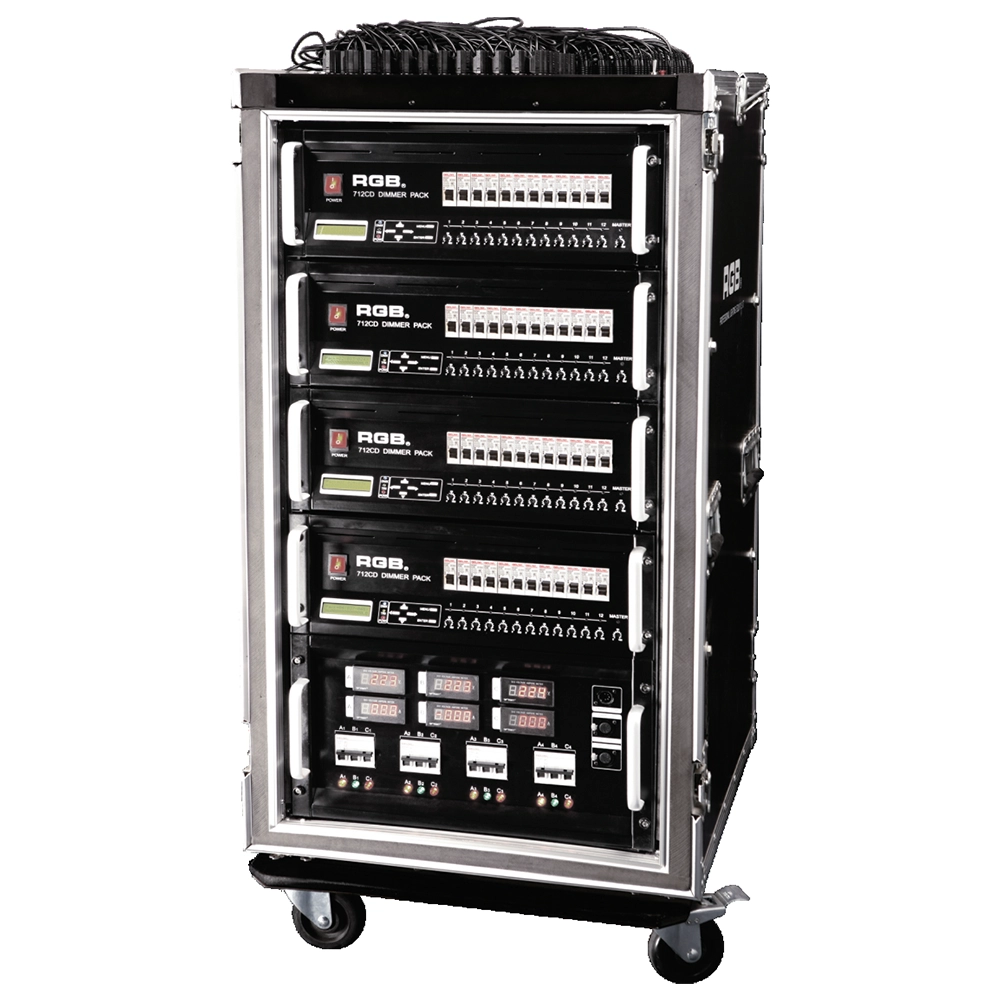
Intelligent Network Touring Dimmer Racks
RGB intelligent network touring dimmer racks can be assembledinto many types of dimmer racks by taking 7 series dimmer
packs as the unit. They are widely used in the entertainment fortheir convenience and practicabillity,
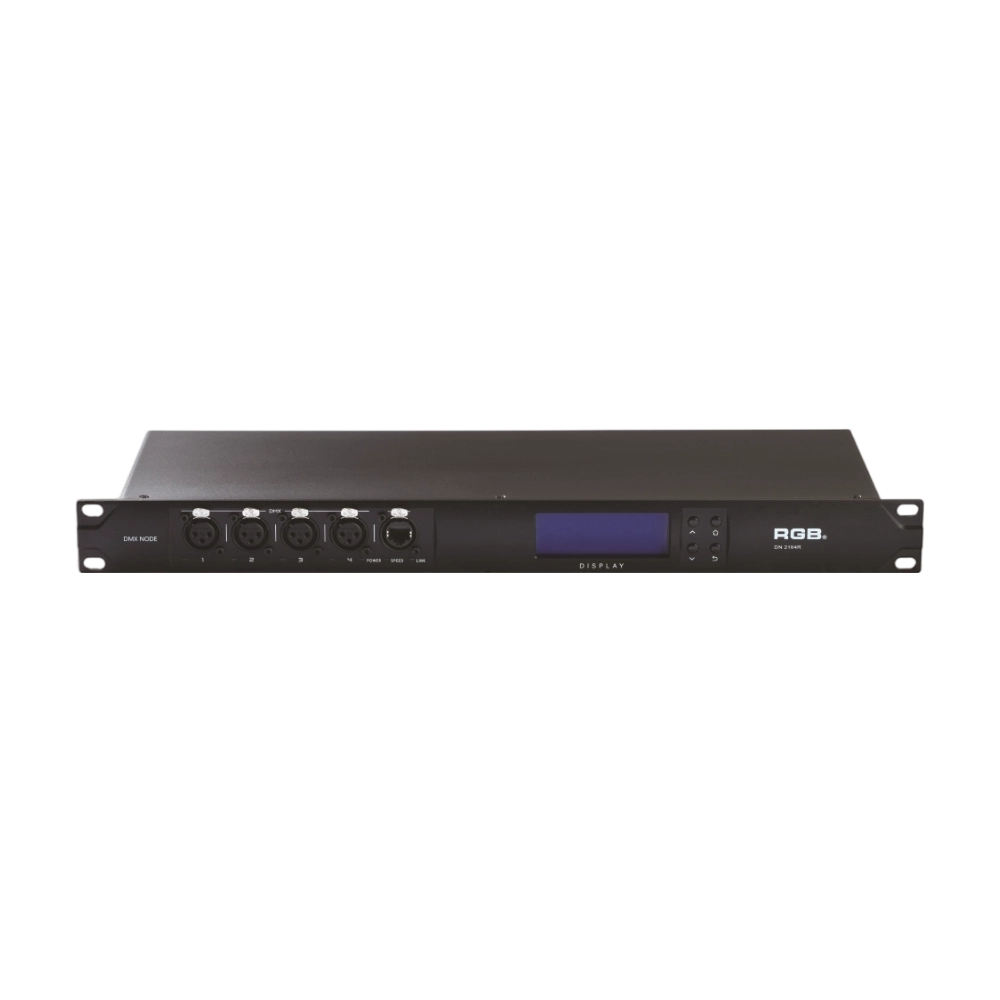
DMX, RDM Nodes
The DN series dual network port network decoder is a lighting control system product independently developed by RGB, featuring completely independent core technology and software copyright. It seamlessly connects and decodes the sACN and ART-Net network protocols based on TCP/IP with the DMX-512 and RDM communication protocols, achieving gigabit communication with dual independent physical address codes. Supports a visual lighting control system, intuitively displaying the online and offline status of the DN series network decoders, and enabling remote monitoring, editing, and setting of corresponding parameters.
It is widely applied in theaters, concert halls, multi-functional halls, cultural and tourism performances, TV stations, gymnasiums, auditoriums, commercial art lighting, and other performance and cultural venues.
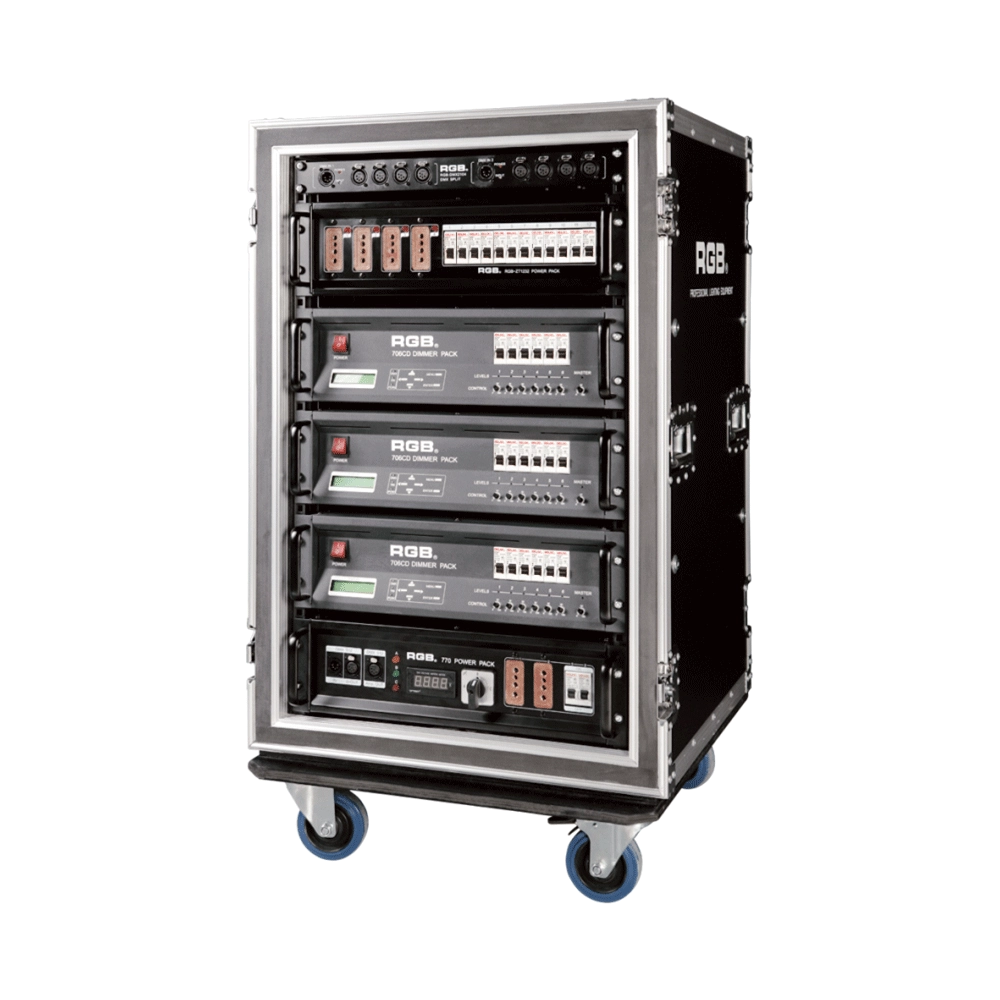
7 Series Digital Touring Dimmer Racks
7 Series digital touring dimmer racks can be assembled into many types of dimmer by taking the 7 Series dimmer as the unit. They are widely used in the entertainment industry for their convenience and practicability.
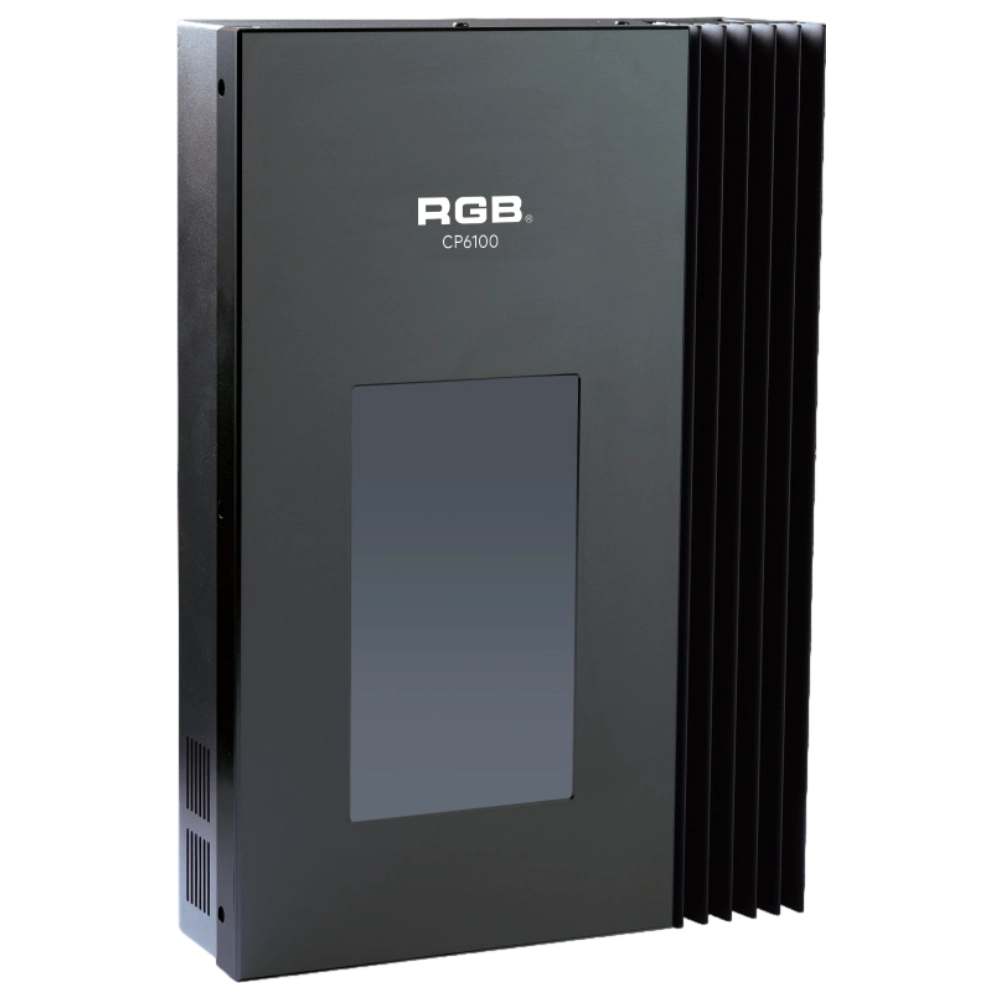
CP6100 Light Control System
The lighting control host is the main control device for theater stage lights, work lights, environmental lighting, commercial art lighting, sports venue lighting, and other places. By connecting the dedicated lighting control panels CP6104 and CP6108, it realizes the central control of the lighting system, supports a visual lighting control system, and intuitively displays the online and offline status of CP6100. Realize remote monitoring, editing, and setting of corresponding parameters.
It is widely applicable to theaters, cinemas, auditoriums, stadiums, museums, exhibition halls, cultural tourism performances, commercial art lighting, and other places.
Expert Support
Interested in learning more or need expert guidance related to this article? Fill in your details, and our team will provide tailored support.
Intelligent Control. Brilliant Performance.
RGB specializes in stage lighting control systems, delivering intelligent, reliable, and high-performance solutions for theaters and performance spaces worldwide.
Contact
Email:
Tel:
+86 20 3928 0245
+86 20 3928 0247
Address:
No.3, Huashan Road, Shilou Town, Panyu, Guangzhou, China.
Whatsapp: +8615975520131