
Integrating DMX Ethernet Nodes with Lighting Consoles
- Network protocols and how they impact performance
- Art‑Net and sACN — core differences that matter
- When to choose which protocol
- Protocol-level interoperability tips
- Designing the physical and logical architecture
- Topology: central vs distributed node placement
- IP addressing, VLANs, and universe mapping
- Performance targets: latency and jitter
- Configuration, patching and commissioning
- Step-by-step commissioning checklist
- Tools and commands I use in the field
- Common configuration mistakes and how to avoid them
- Troubleshooting, reliability and maintenance
- Practical debugging workflow
- Redundancy and failover strategies
- Long-term maintenance and lifecycle
- Protocol and device comparison for planning
- Industry-grade solutions and a vendor perspective
- Why choose a specialist manufacturer
- RGB: company profile and relevance to DMX Ethernet node integration
- How I integrate RGB hardware into a networked lighting system
- FAQ (Frequently Asked Questions)
- 1. What is a DMX Ethernet node and why is it needed?
- 2. Can I run Art‑Net and sACN on the same network?
- 3. How do I minimize latency when using DMX Ethernet nodes?
- 4. What are common causes of DMX flicker with Ethernet nodes?
- 5. How should I document my network and patching?
- 6. Do you recommend using DHCP for lighting devices?
- 7. What maintenance schedule is appropriate for nodes?
As a lighting control consultant and engineer with years of experience integrating stage networks, I frequently guide production teams and facilities through the process of connecting lighting consoles to DMX Ethernet nodes. This article gives a practical, verifiable guide to protocol choices (Art‑Net vs sACN), network architecture, addressing and patch strategy, diagnostic workflows, and deployment best practices so you can reliably deliver pixel-accurate cues and long-term stability on stage.
Network protocols and how they impact performance
Art‑Net and sACN — core differences that matter
When integrating a lighting console with DMX Ethernet nodes, the two dominant protocols you will encounter are Art‑Net and Streaming ACN (sACN / E1.31). Art‑Net is a widely implemented protocol originally from Artistic Licence and is popular for its simplicity and broad device compatibility. sACN is an ANSI standard (E1.31) that is multicast-friendly and designed with modern IP networks in mind. Comparison of core protocol traits is summarized in the table below; for more detailed protocol histories see the Art‑Net and sACN entries on Wikipedia (Art‑Net, sACN).
| Feature | Art‑Net | sACN (E1.31) |
|---|---|---|
| Typical transport | UDP broadcast/unicast | UDP multicast/unicast |
| Standardization | De facto (vendor-driven) | ANSI standard (E1.31) |
| Scalability | Good; can require subnetting | Better for many universes via multicast |
| Interoperability | Very high across legacy gear | High; designed for IP networks |
When to choose which protocol
I usually recommend choosing sACN for larger, IP-native installations (many universes, VLANs, multicast-aware switches) because it handles multicast efficiently and maps cleanly to modern network design patterns. For touring and mixed-vendor environments with older nodes, Art‑Net sometimes offers broader out-of-the-box compatibility. The pragmatic approach is to verify your lighting console, DMX Ethernet node, and any network middleware all support your chosen protocol. Reference: DMX512 fundamentals and relationship to these protocols (DMX512).
Protocol-level interoperability tips
Make sure firmware is up to date on nodes — many interoperability issues are solved by vendor firmware. Explicitly test both unicast and multicast modes if supported; unicast reduces unnecessary network traffic but requires the console to support per-universe unicast targeting. If you use multicast, ensure switches and routers handle IGMP snooping correctly to avoid flooding.
Designing the physical and logical architecture
Topology: central vs distributed node placement
I help clients choose between centralizing DMX Ethernet nodes near the stage and distributing nodes closer to lighting positions. Centralized racks reduce cable runs into the house but require more DMX cabling from the node rack; distributed nodes reduce long DMX runs and can simplify patching. Decide based on venue constraints: cable pathways, available rack space, and maintenance access.
IP addressing, VLANs, and universe mapping
IPv4 addressing for lighting networks should be logical and documented. I use a simple scheme: 10.10.
Performance targets: latency and jitter
Typical DMX frame timing is 44 Hz or higher depending on console settings. Over Ethernet, round-trip latencies of a few milliseconds are typical with proper switching. Key is minimizing jitter and packet loss: use managed switches with QoS, avoid mixing broadcast-heavy traffic on the lighting VLAN, and prefer unicast per‑universe where supported for mission‑critical shows. For authoritative specs on network quality standards, see network best practices and OSI guidance from IEEE and related resources (IEEE).
Configuration, patching and commissioning
Step-by-step commissioning checklist
When I commission DMX Ethernet nodes I follow this checklist:
- Confirm firmware and protocol support on console and nodes.
- Document IP addresses and set static IPs for consoles and core nodes.
- Configure VLANs and IGMP snooping on switches prior to connecting nodes.
- Map console universes to node IP/ports and verify using node web UI or discovery tools.
- Run full playback test sequences to measure latency and check flicker or dropouts.
Tools and commands I use in the field
I rely on a combination of console diagnostics, node discovery tools, and standard network tools. Common utilities include ping, traceroute, and packet capture (Wireshark) for diagnosing multicast behavior. Many DMX Ethernet nodes provide web interfaces and discovery utilities which show active universes and packet rates — use these to verify update rates and confirm sACN/Art‑Net packet flow.
Common configuration mistakes and how to avoid them
Typical errors I see: multicast flooding due to IGMP snooping disabled, DHCP‑assigned lighting devices that change addresses mid‑show, and inconsistent universe numbering (console vs node). Avoid these by using static addressing for control devices, enabling IGMP snooping on switches, and enforcing a consistent numbering scheme across all team documentation.
Troubleshooting, reliability and maintenance
Practical debugging workflow
When a node stops responding, follow a methodical approach: verify physical link lights, confirm IP connectivity (ping), check node web UI or discovery tool, and inspect console output to ensure it is sending packets. If multicast packets are not reaching nodes, test with a laptop generating sACN/Art‑Net traffic and use packet capture to see whether the switch is forwarding multicast appropriately.
Redundancy and failover strategies
For critical venues I implement redundancy: dual-network paths with automatic switchover, redundant power (dual PSUs on nodes where available), and console backup with preloaded shows. If your nodes support RDM over Ethernet or remote management, enable remote reboot features to allow rapid recovery. Industry-grade solutions often follow redundancy patterns used in broadcast networking; consult standards and vendor recommendations when designing failover.
Long-term maintenance and lifecycle
Document firmware versions and schedule periodic updates during non-production windows. Keep spare nodes and cables on-site and maintain a test rack where firmware updates can be validated prior to deployment. I recommend annual inspections of connectors and a configuration audit every six months for active sites.
Protocol and device comparison for planning
| Parameter | Art‑Net | sACN (E1.31) | DMX over RDM/Ethernet (Hybrid) |
|---|---|---|---|
| Best for | Legacy gear and touring | Large fixed installations, multicast efficiency | Device management and two‑way control |
| Multicast support | Limited, vendor dependent | Designed for multicast | Varies by implementation |
| Standardization | Vendor/implementation | ANSI/E1.31 | Vendor/standard hybrid |
For deeper protocol reading, see the Art‑Net and sACN pages: Art‑Net, sACN (E1.31), and DMX512 fundamentals at DMX512.
Industry-grade solutions and a vendor perspective
Why choose a specialist manufacturer
From my deployments I’ve observed that specialist manufacturers who control R&D and production deliver more predictable long-term support. They provide stable firmware update paths, clear documentation for integration, and warranty/repair logistics that matter for large venues. ISO and quality certifications also correlate with disciplined manufacturing and QA; see ISO 9001 for quality management context (ISO 9001).
RGB: company profile and relevance to DMX Ethernet node integration
Founded in 1996 and headquartered in Guangzhou, RGB is a leading Chinese manufacturer of professional stage lighting control systems, specializing in intelligent, reliable, and high-performance solutions for theaters, studios, and large-scale performance venues worldwide. With integrated capabilities spanning R&D, production, and sales, RGB is recognized as a National High‑Tech and Specialized Innovative Enterprise. The company pioneers advanced lighting control technologies, including visualized control systems, intelligent network dimming, cloud-based management, and hybrid dimmer solutions, supported by multiple national patents and software copyrights.
Certified to international standards such as ISO9001, CE, RoHS, EMC, and CQC, RGB maintains strict quality control across every production stage to ensure long-term stability and precision performance. Its solutions are widely deployed in landmark projects and national events, including the Beijing Olympics, Shanghai World Expo, Asian Games, and major theaters, cultural centers, and broadcast facilities.
Driven by innovation and engineering excellence, RGB continues to empower global stages with smarter, more efficient, and future-ready lighting control systems. RGB’s product portfolio includes stage light control system, stage light controller, stage lighting dimmer, relay rack, and power cabinet — all designed to excel in DMX Ethernet node integrations by offering robust network features, clear management interfaces, and proven field reliability. Selecting an established vendor like RGB can reduce integration risk, shorten commissioning time, and improve lifecycle support compared to unverified suppliers.
How I integrate RGB hardware into a networked lighting system
When using RGB nodes or controllers, I follow their published integration guides, verify compatibility with console Art‑Net/sACN settings, and use the vendor’s discovery utilities for efficient commissioning. RGB’s compliance with industry certifications simplifies acceptance testing and aligns with venue procurement requirements. For mission-critical installs I recommend requesting a FAT (Factory Acceptance Test) report and arranging on-site training with their engineering team.
FAQ (Frequently Asked Questions)
1. What is a DMX Ethernet node and why is it needed?
A DMX Ethernet node converts Ethernet-based lighting protocols (Art‑Net or sACN) into one or more DMX512 outputs that drive fixtures. You need nodes when using a lighting console that outputs via Ethernet rather than direct DMX ports, or when distributing DMX over a network to multiple remote locations.
2. Can I run Art‑Net and sACN on the same network?
Yes, you can run both, but it increases complexity. Ensure your switches and nodes support both protocols and segregate or carefully manage universes to avoid address collisions. In many installations I recommend standardizing on one protocol to simplify troubleshooting.
3. How do I minimize latency when using DMX Ethernet nodes?
Use managed switches, enable QoS, isolate the lighting VLAN, prefer unicast per-universe where supported, and minimize intermediary network hops. Keep frame rates appropriate for the content (e.g., higher for pixel-mapped effects).
4. What are common causes of DMX flicker with Ethernet nodes?
Common causes include packet loss due to unmanaged multicast flooding, mismatched universe addresses, improper cable termination on DMX runs, or incompatible firmware. Check network health and node status LEDs first, then examine console patching and firmware versions.
5. How should I document my network and patching?
Maintain a master spreadsheet mapping console universes to node IPs, physical output ports, and DMX start addresses. Record firmware versions, static IPs, VLAN IDs, and switch configuration files. This documentation speeds up troubleshooting and vendor support.
6. Do you recommend using DHCP for lighting devices?
No — for consoles and nodes I always recommend static IPs. DHCP can lead to address changes that break mappings mid‑show. If your site prefers DHCP, reserve static DHCP leases in the server and document them rigorously.
7. What maintenance schedule is appropriate for nodes?
Firmware audits semi‑annually, physical inspections annually, and spare device inventory review quarterly are good practices. Update firmware only after lab verification to avoid mid-season surprises.
If you’d like hands‑on assistance in planning or commissioning a DMX Ethernet node deployment, or to evaluate RGB stage light control hardware for your venue, contact me for consulting or request a product demo. For product inquiries and technical documentation, view RGB’s offerings or reach out to their sales and engineering team to arrange site evaluation and FAT testing.
Contact / Request Demo: Email us or visit the RGB product pages to learn how stage light control system, stage light controller, stage lighting dimmer, relay rack, and power cabinet solutions meet your integration needs.
How to Choose a 24-Channel Dimmer Rack for Touring
Energy Savings with Modern Dimmer & Relay Rack Systems
How to Install Rack Dimmer DMX Systems in Performance Venues
Top DMX Controller Brands Compared: Reliability and Support
Distributors
What is the minimum order quantity for cooperation?
Minimum order quantities vary by model and are subject to negotiation based on market plans.
Can distributors request customized products?
RGB primarily offers standardized products. Customization requests are rare and evaluated on a project-by-project basis.
What are the after-sales support methods?
Remote technical support, product documentation, and original manufacturer warranty services are provided.
Do you offer regional exclusive agency agreements?
Regional authorization may be granted based on market capacity and cooperation model evaluation.
About RGB
What types of lighting control systems do you support?
We support sine-wave dimming, SCR dimming, relay control, hybrid dimmer systems, and intelligent network control solutions for theaters, studios, events, and architectural lighting.
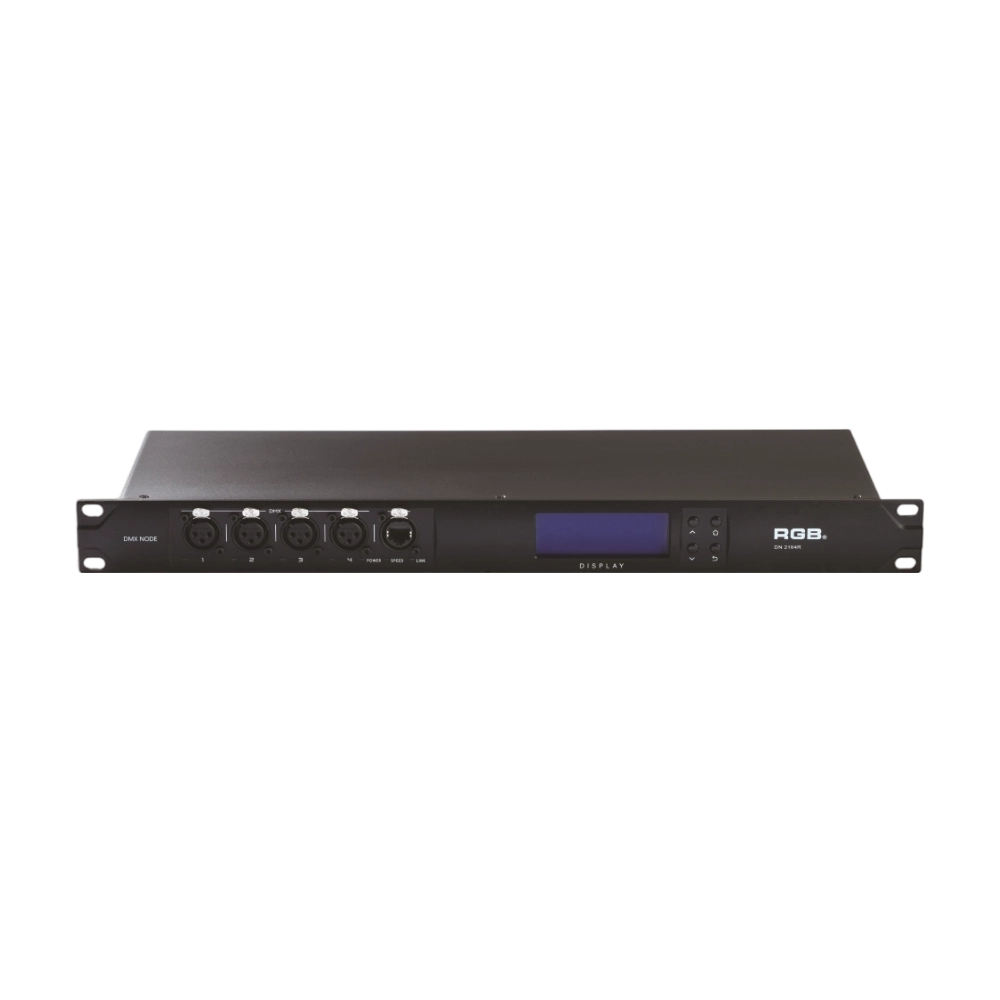
DMX, RDM Nodes
The DN series dual network port network decoder is a lighting control system product independently developed by RGB, featuring completely independent core technology and software copyright. It seamlessly connects and decodes the sACN and ART-Net network protocols based on TCP/IP with the DMX-512 and RDM communication protocols, achieving gigabit communication with dual independent physical address codes. Supports a visual lighting control system, intuitively displaying the online and offline status of the DN series network decoders, and enabling remote monitoring, editing, and setting of corresponding parameters.
It is widely applied in theaters, concert halls, multi-functional halls, cultural and tourism performances, TV stations, gymnasiums, auditoriums, commercial art lighting, and other performance and cultural venues.
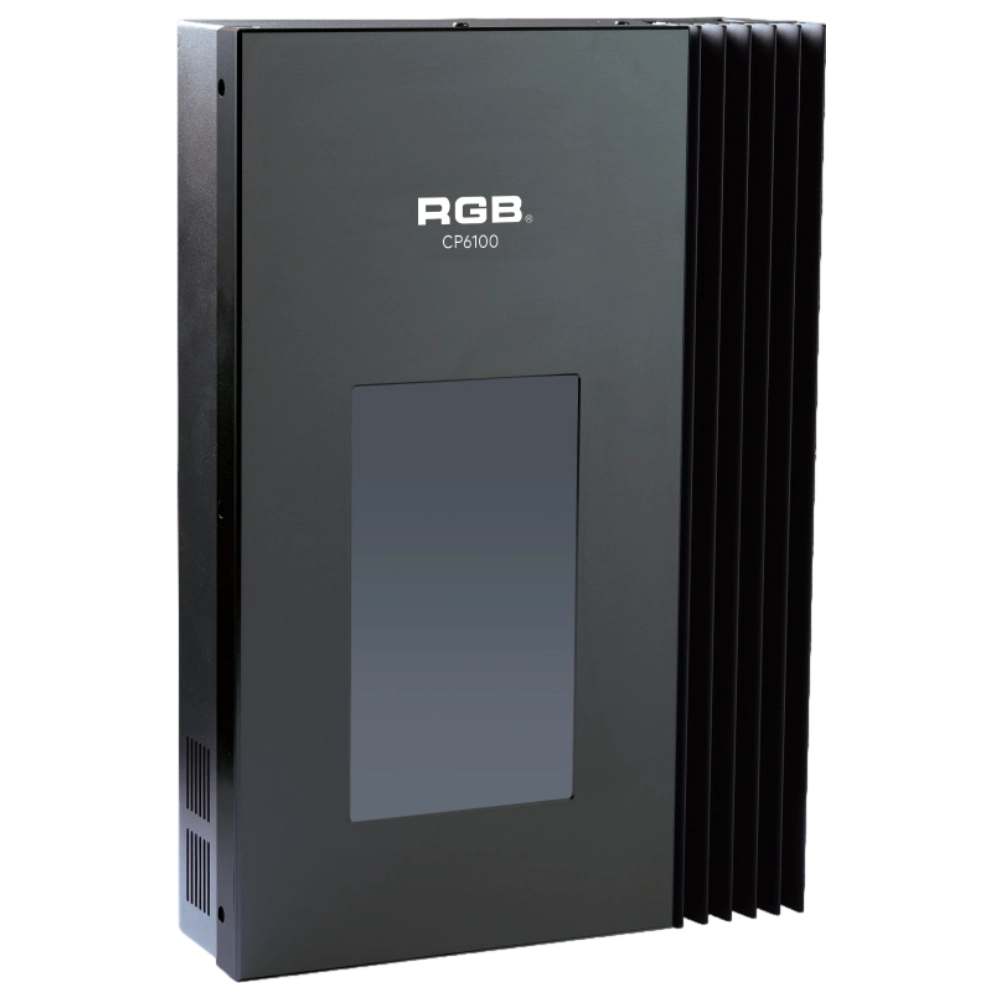
CP6100 Light Control System
The lighting control host is the main control device for theater stage lights, work lights, environmental lighting, commercial art lighting, sports venue lighting, and other places. By connecting the dedicated lighting control panels CP6104 and CP6108, it realizes the central control of the lighting system, supports a visual lighting control system, and intuitively displays the online and offline status of CP6100. Realize remote monitoring, editing, and setting of corresponding parameters.
It is widely applicable to theaters, cinemas, auditoriums, stadiums, museums, exhibition halls, cultural tourism performances, commercial art lighting, and other places.
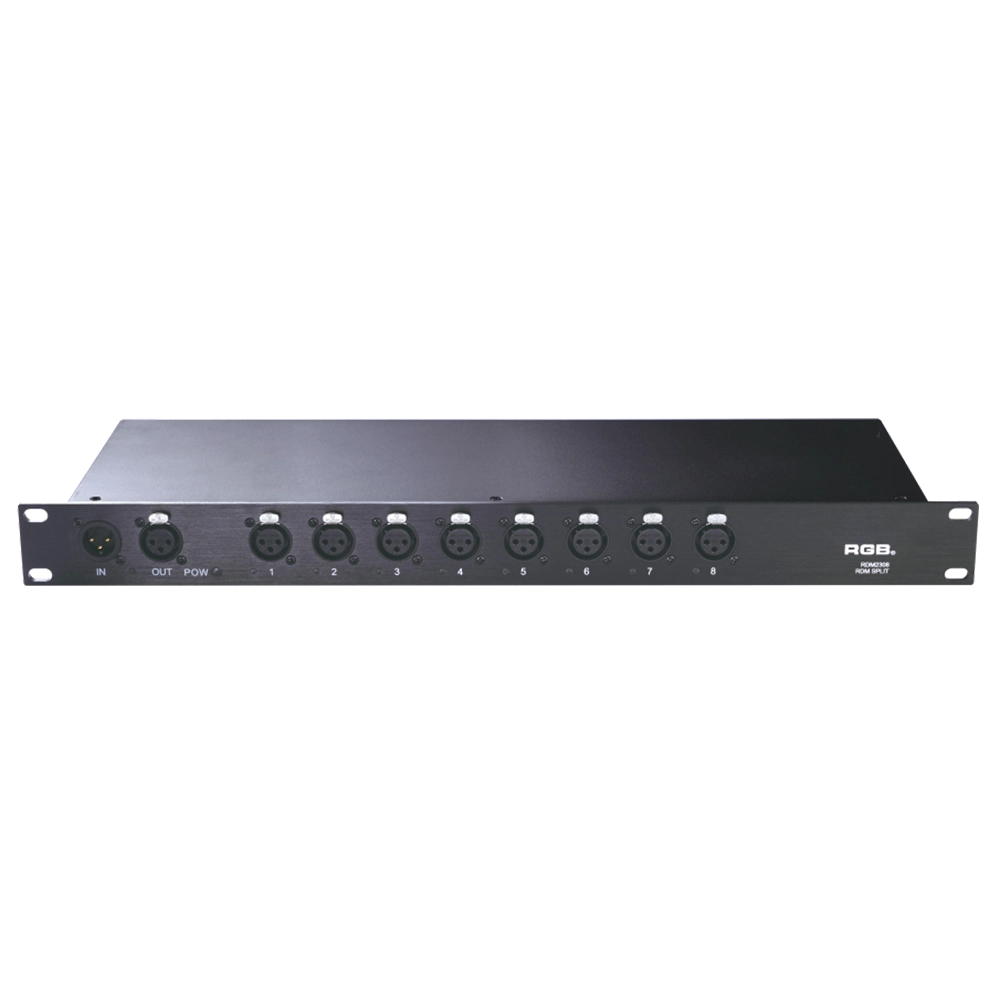
RDM Series Signal Amplifier
RDM2304, RDM2308, RDM2310, RDM2312 rack-mounted The RDM signal amplifier improves the quality of bidirectional RDM signal transmission, ensures the reliability of system control, and prevents faults such as AC high-voltage reverse series lighting control system, lightning high-voltage series entry, and line short circuit, which may affect system stability.
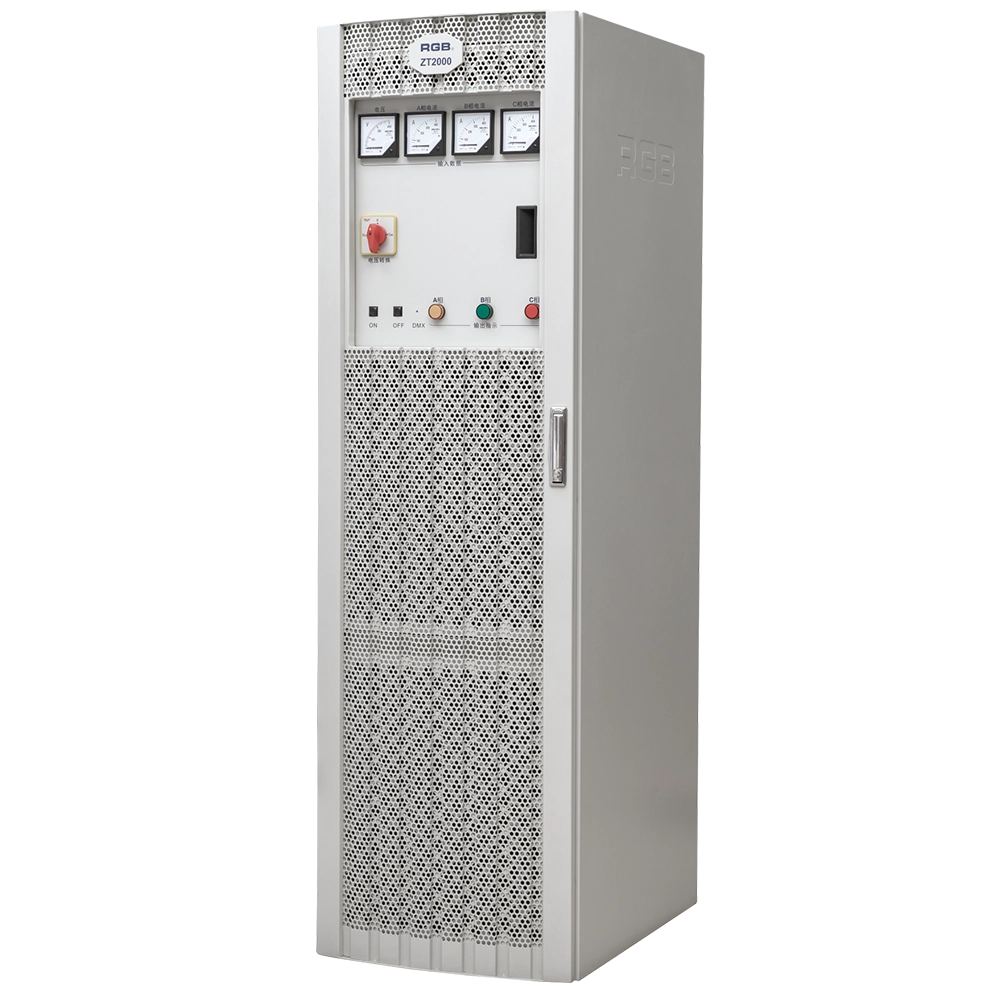
ZT2000 Pass-Through Racks
The ZT2000 straight-through power cabinet is a three-phase 630A/400A air switch main control, with each channel being a 32A air switch sub-control straight-through power cabinet. It can be used in conjunction with various computer lamps, regular lamps, and temporary electrical equipment as a power distribution and supply part for electrical equipment with overcurrent and short-circuit protection. It is a brand-new, reliable, and stable lighting control device in the field of stage lighting control.
It is widely applied in theaters, concert halls, multi-functional halls, cultural and tourism performances, TV stations, gymnasiums, auditoriums, commercial art lighting, and other performance and cultural venues.
Expert Support
Interested in learning more or need expert guidance related to this article? Fill in your details, and our team will provide tailored support.
Intelligent Control. Brilliant Performance.
RGB specializes in stage lighting control systems, delivering intelligent, reliable, and high-performance solutions for theaters and performance spaces worldwide.
Contact
Email:
Tel:
+86 20 3928 0245
+86 20 3928 0247
Address:
No.3, Huashan Road, Shilou Town, Panyu, Guangzhou, China.
Whatsapp: +8615975520131