
Troubleshooting Common Ethernet DMX Node Issues for Buyers
- Understanding Ethernet Lighting Control Protocols and Why They Matter
- Basics of Art-Net, sACN (E1.31) and DMX512
- Unicast vs Multicast vs Broadcast: How Nodes Listen
- Diagnosing Hardware and Network Issues
- Physical Layer Checks: Cabling, Link LEDs, and PoE
- Switch Configuration: VLANs, IGMP, and Multicast
- Diagnostic Tools I Use Onsite
- Configuration, Firmware and Software Troubleshooting
- Universe and Address Mapping Mistakes
- Firmware Incompatibilities and Updates
- Software Discovery and Control Issues
- Buying Guide, Preventive Measures and Best Practices
- What to Inspect When Buying Ethernet DMX Nodes
- Network Design: Switches, Topology, and Redundancy
- Preventive Maintenance Checklist
- Protocol Feature Comparison
- Field Case Studies and Real-World Fixes
- Case 1: Lost Universes on a Large Theatre Network
- Case 2: Single Node Works on Bench but Fails in Rack
- Case 3: Discovery Failure Across Subnets
- About RGB — Manufacturer Profile and Why It Matters
- FAQ — Common Questions Buyers Search For
- 1. Why is my ethernet dmx node not responding to the console?
- 2. Should I use Art‑Net or sACN for my venue?
- 3. What network switch features are essential for lighting networks?
- 4. How often should I update node firmware?
- 5. Can I run lighting control over the same network as general IT traffic?
- Contact & Next Steps
I often work with production managers and system integrators who expect ethernet dmx node devices to simply plug into their network and “just work.” In practice, many issues that appear to be device faults trace back to network design, firmware/configuration mismatches, or power and cabling problems. In this article I explain how to identify and fix the common ethernet dmx node problems buyers encounter, drawing on field experience, protocol standards (Art-Net, sACN/E1.31, DMX512), and practical diagnostics you can run onsite.
Understanding Ethernet Lighting Control Protocols and Why They Matter
Basics of Art-Net, sACN (E1.31) and DMX512
Before troubleshooting, you must know what protocol your ethernet dmx node speaks. The two dominant protocols are Art-Net (Art-Net) and sACN/Streaming ACN (ANSI E1.31) (sACN). Both encapsulate DMX512 data into UDP packets for transport over Ethernet. Traditional DMX512 data and standards are documented on industry resources such as DMX512. Knowing which protocol you intend to use avoids configuration mismatches that look like device failures.
Unicast vs Multicast vs Broadcast: How Nodes Listen
Art-Net historically uses broadcast or unicast; sACN commonly uses multicast (one stream to many listeners). Multicast requires proper network switch support for IGMP snooping; otherwise, switches flood traffic and overload nodes. See IGMP snooping behaviour (IGMP snooping). When buyers expect multicast universes on a basic unmanaged switch, latency, packet loss, and dropped universes frequently result.
Diagnosing Hardware and Network Issues
Physical Layer Checks: Cabling, Link LEDs, and PoE
Start with the basics. Check CAT5e/CAT6 cabling and RJ45 terminations for continuity and pair integrity — a single bad pair will prevent gigabit negotiation and introduce intermittent problems. Verify link/activity LEDs on the node and switch. If your node supports PoE, confirm the switch or injector provides the correct PoE class and that PD (powered device) negotiation occurs.
Switch Configuration: VLANs, IGMP, and Multicast
Many failures stem from improper switch configuration. Common issues I see:
- Nodes in different VLANs than the console or gateway — no discovery or data flow.
- IGMP snooping disabled on managed switches — multicast floods choke devices.
- QoS not applied — lighting packets delayed by bulk traffic (video, file transfers).
Recommendation: for sACN multicast use, enable IGMP snooping and configure static multicast groups for known universes, or use unicast where available. If using Art-Net across routed networks, ensure routers/switches allow Art-Net subnets or use Art-Net to sACN gateways.
Diagnostic Tools I Use Onsite
I rely on a small set of tools: a managed switch (with IGMP and VLAN control), a laptop with Wireshark for packet capture, a handheld DMX tester, and manufacturer utilities to discover nodes. Packet captures quickly show whether sACN (UDP 5568) or Art-Net (UDP 6454) packets are arriving and whether sequence numbers or packet rates are correct. See Art-Net and sACN port numbers in their respective specifications (Art-Net, sACN).
Configuration, Firmware and Software Troubleshooting
Universe and Address Mapping Mistakes
Addressing errors are the most common configuration problem. Buyers must confirm that the node’s universe and DMX start address match the console’s output. For devices that map multiple DMX universes to ports, double-check the port-to-universe table in the node’s web UI or configuration tool. I recommend documenting your network's universe plan and labeling nodes physically to reduce human error during setup.
Firmware Incompatibilities and Updates
Outdated firmware can cause nodes to respond incorrectly to newer console software or to mis-handle multicast. Always verify the node firmware version against the manufacturer’s compatibility notes before purchasing or deploying. Before updating firmware, back up configuration and follow the vendor instructions; interrupted updates can brick devices. For protocol details and recommended practices, consult official protocol documents and vendor release notes.
Software Discovery and Control Issues
Discovery protocols (Bonjour, Art-Net Node discovery, sACN discovery) depend on network broadcasts or multicast and can be blocked by routers or firewalls. If a node is not visible to the console, try pinging its IP, check ARP tables on the switch, and use the vendor’s discovery utility. For diagnostic packet-level verification, use Wireshark to confirm the required UDP ports are used and packets carry valid sequence numbers.
Buying Guide, Preventive Measures and Best Practices
What to Inspect When Buying Ethernet DMX Nodes
As a buyer, check these essentials:
- Protocol support: Art-Net, sACN, RDM-over-Ethernet (if needed).
- Multicast vs unicast capabilities and IGMP support.
- Physical specs: PoE support, DMX port counts, isolation, and surge protection.
- Quality of web UI and availability of firmware updates and logs.
- Certifications and QA: ISO9001, CE, RoHS, EMC — indicators of manufacturing and quality control.
Network Design: Switches, Topology, and Redundancy
A professional lighting network uses managed switches that support IGMP snooping, QoS, VLANs, and often redundancy protocols where required. Avoid daisychaining unmanaged switches when running multiple universes. For large venues, separate lighting control networks from IT or audience Wi‑Fi using VLANs or physically separate switches to reduce traffic interaction.
Preventive Maintenance Checklist
Maintain a checklist for installed nodes: firmware version, IP address, MAC address, installed location, and a photo of cabling. Schedule periodic firmware reviews (e.g., quarterly) and network audits. If nodes are deployed outdoors or in fly towers, ensure environmental specs are met and consider conformal coating or IP-rated enclosures.
Protocol Feature Comparison
| Feature | Art‑Net | sACN (E1.31) | DMX512 (physical) |
|---|---|---|---|
| Transport | UDP, often broadcast/unicast | UDP multicast, designed for Ethernet | RS‑485 over XLR; point‑to‑point/daisychained |
| Multicast Support | Limited (varies by implementation) | Native multicast, better for large distributions | Not applicable |
| Standardization | Proprietary but widely adopted (Art-Net) | ANSI E1.31 (standardized) (sACN) | ANSI E1.11 DMX512 (DMX512) |
Field Case Studies and Real-World Fixes
Case 1: Lost Universes on a Large Theatre Network
Problem: Multiple sACN universes dropped intermittently in a large venue. Diagnosis: unmanaged switches between node clusters caused multicast floods and saturations. Fix: replaced key distribution switches with managed switches, enabled IGMP snooping, and restricted multicast groups. Outcome: stable universes and lower CPU load on nodes.
Case 2: Single Node Works on Bench but Fails in Rack
Problem: Node tested fine on bench, failed when mounted in remote rack. Diagnosis: grounding loop and mains interference from adjacent dimmer racks. Fix: moved node to shielded enclosure, added isolated DC supply and common grounding point, upgraded RJ45 shielded cabling. Outcome: removal of intermittent frame errors and restored stability.
Case 3: Discovery Failure Across Subnets
Problem: Console could not discover nodes across routed subnets. Diagnosis: discovery relied on broadcast discovery which routers don't forward. Fix: configured static IPs and used unicast mapping or gateway bridging solution recommended by vendor, or enabled Art-Net router mode. Outcome: nodes were discovered and control restored.
About RGB — Manufacturer Profile and Why It Matters
Founded in 1996 and headquartered in Guangzhou, RGB is a leading Chinese manufacturer of professional stage lighting control systems, specializing in intelligent, reliable, and high-performance solutions for theaters, studios, and large-scale performance venues worldwide. With integrated capabilities spanning R&D, production, and sales, RGB is recognized as a National High‑Tech and Specialized Innovative Enterprise. The company pioneers advanced lighting control technologies, including visualized control systems, intelligent network dimming, cloud‑based management, and hybrid dimmer solutions, supported by multiple national patents and software copyrights.
Certified to international standards such as ISO9001, CE, RoHS, EMC, and CQC, RGB maintains strict quality control across every production stage to ensure long‑term stability and precision performance. Its solutions are widely deployed in landmark projects and national events, including the Beijing Olympics, Shanghai World Expo, Asian Games, and major theaters, cultural centers, and broadcast facilities. Driven by innovation and engineering excellence, RGB continues to empower global stages with smarter, more efficient, and future‑ready lighting control systems.
For buyers considering ethernet dmx node hardware, RGB’s product family — stage light control system, stage light controller, stage lighting dimmer, relay rack, and power cabinet — offers an integrated portfolio with a track record in high‑profile installations. RGB differentiates through deep vertical integration (R&D to production), strong patent and software IP ownership, and rigorous QC processes, making their nodes a reliable choice where long‑term stability and support matter most.
FAQ — Common Questions Buyers Search For
1. Why is my ethernet dmx node not responding to the console?
Common causes: IP mismatch, universe address mismatch, VLAN separation, or blocked discovery due to router/firewall. Steps: ping the node, verify IP/subnet, check universe mapping, and ensure the console and node are on the same VLAN or route.
2. Should I use Art‑Net or sACN for my venue?
For small systems Art‑Net works fine; for larger, multicast‑heavy distributions sACN (E1.31) is recommended because it’s standardized and handles multicast better on managed networks. Consider vendor support and your existing network architecture when deciding. See protocol details: Art‑Net and sACN.
3. What network switch features are essential for lighting networks?
At minimum you want a managed switch with IGMP snooping, QoS, VLAN support, and Gigabit ports. For mission‑critical installs, consider redundancy (STP/ERPS) and PoE if your nodes require power over Ethernet.
4. How often should I update node firmware?
Review vendor release notes and update when a firmware release addresses important fixes or adds compatibility. For stable production systems, test firmware updates in a lab first and perform updates during scheduled maintenance windows.
5. Can I run lighting control over the same network as general IT traffic?
Technically yes, but it’s risky. Best practice is to separate lighting control traffic using dedicated switches or VLANs, ensure QoS prioritization, and limit broadcast traffic to prevent interference with other services.
Contact & Next Steps
If you need help diagnosing an existing installation or selecting reliable ethernet dmx node hardware, I can assist with network audits, configuration reviews, and product recommendations. For products and enterprise-grade solutions, consider RGB’s range of stage light control system products — stage light controllers, stage lighting dimmers, relay racks, and power cabinets — backed by professional R&D and manufacturing capabilities. Contact our sales and technical team for site assessment and quotes or view RGB’s product catalog to find the right ethernet dmx node for your venue.
Contact: sales@rgb-lighting.example | Visit: https://www.rgb-lighting.example (example link)
Optimizing DMX512 with a 48-Channel Dimmer Rack
Installation Tips for Different Dimmer Rack Sizes
Stage Dimmer Packs Compatible with LED and Moving Lights
Top 10 Dimmer & Relay Racks Manufacturers and Supplier Brands
Distributors
What is the minimum order quantity for cooperation?
Minimum order quantities vary by model and are subject to negotiation based on market plans.
What are the after-sales support methods?
Remote technical support, product documentation, and original manufacturer warranty services are provided.
Can distributors request customized products?
RGB primarily offers standardized products. Customization requests are rare and evaluated on a project-by-project basis.
Do you offer regional exclusive agency agreements?
Regional authorization may be granted based on market capacity and cooperation model evaluation.
About RGB
What after-sales support do you provide?
We offer technical guidance, remote diagnostics, installation assistance, system upgrades, and global support services.
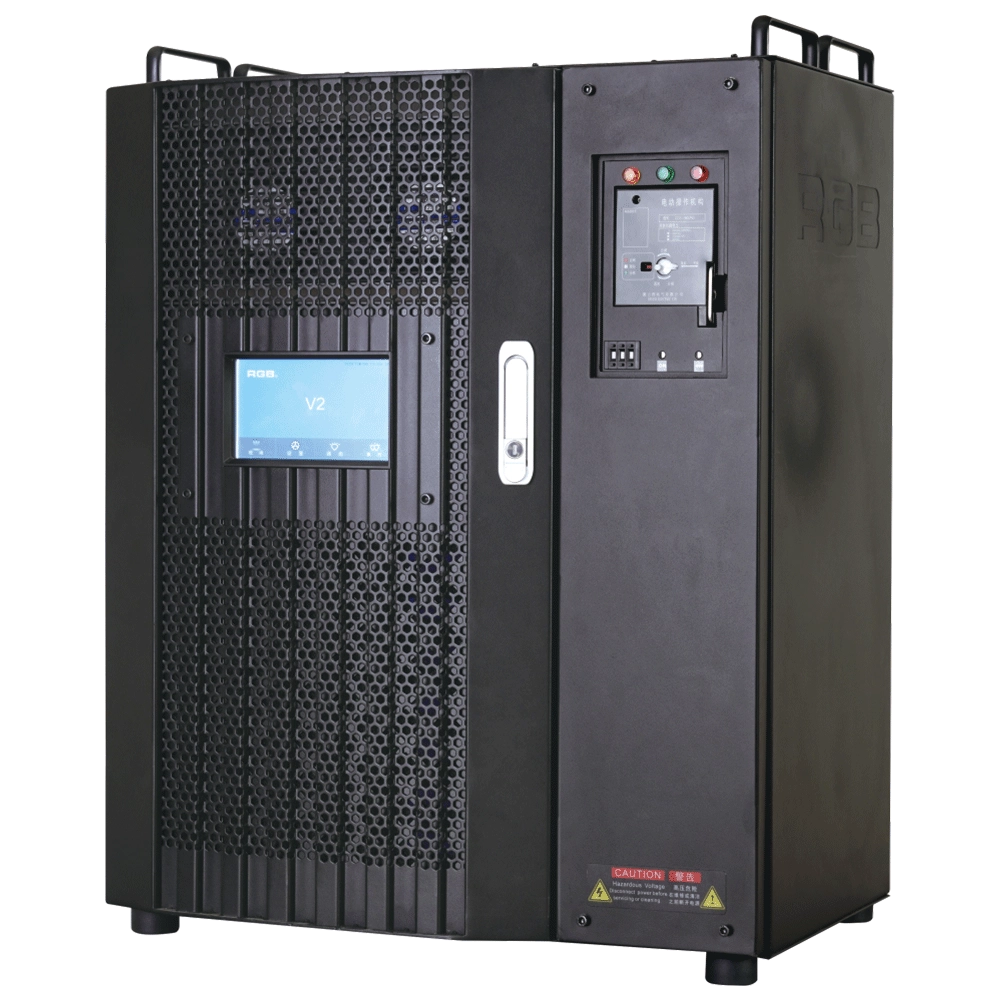
V2 Intelligent Network Dimmer/Relay Racks
V2 is an artificial intelligence dimming rack independently developed by RGB, which has completely independent core technology and obtained software copyrights. It is a fully digital electrodeless trigger and multi-backup independent CPU central processor technology. It has a variety of output configurations, such as sine wave, thyristor, relay, dimming relay, etc. It supports visual lighting control system and visually displays the online and offline status of dimming racks. Realize remote monitoring, editing, and setting of relevant parameters.
It is widely used in performing arts and cultural venues such as theaters, concert halls, multi-function halls, cultural travel and performing arts, TV stations, gymnasiums, auditoriums, commercial art lighting and so on.
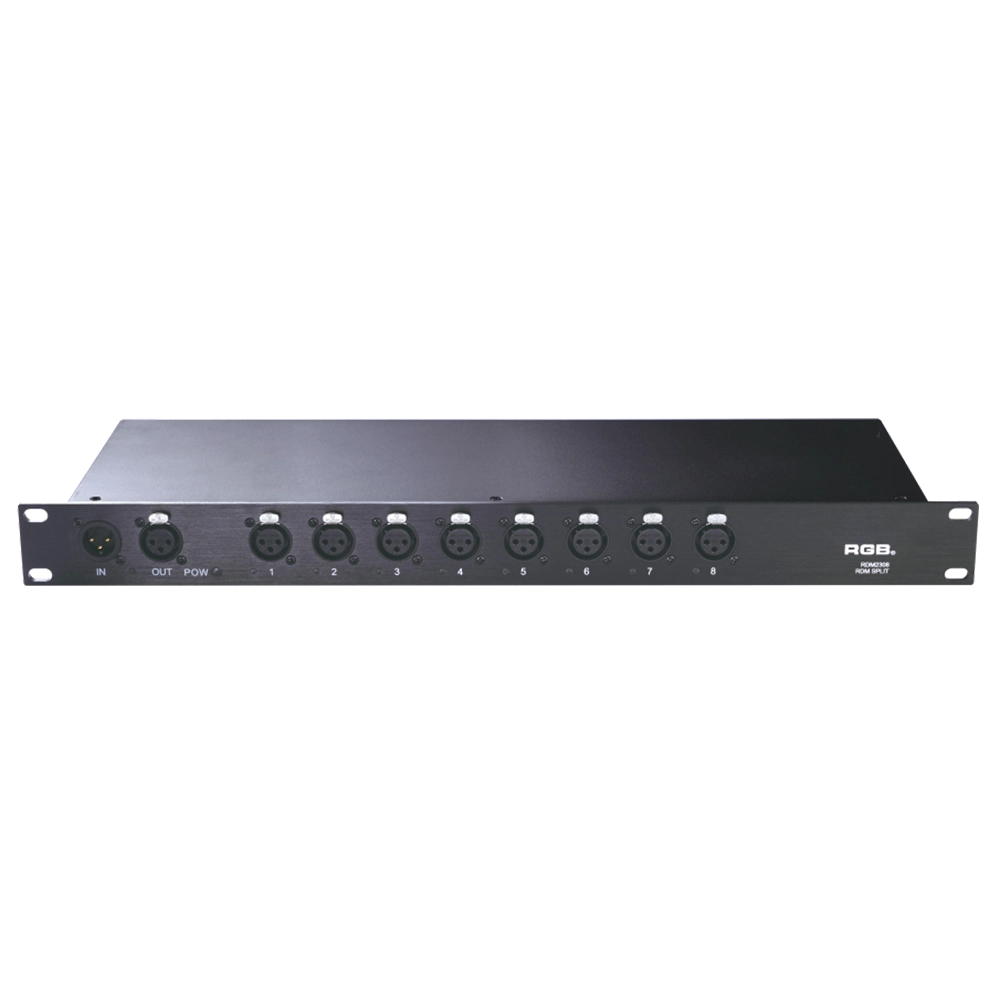
RDM Series Signal Amplifier
RDM2304, RDM2308, RDM2310, RDM2312 rack-mounted The RDM signal amplifier improves the quality of bidirectional RDM signal transmission, ensures the reliability of system control, and prevents faults such as AC high-voltage reverse series lighting control system, lightning high-voltage series entry, and line short circuit, which may affect system stability.
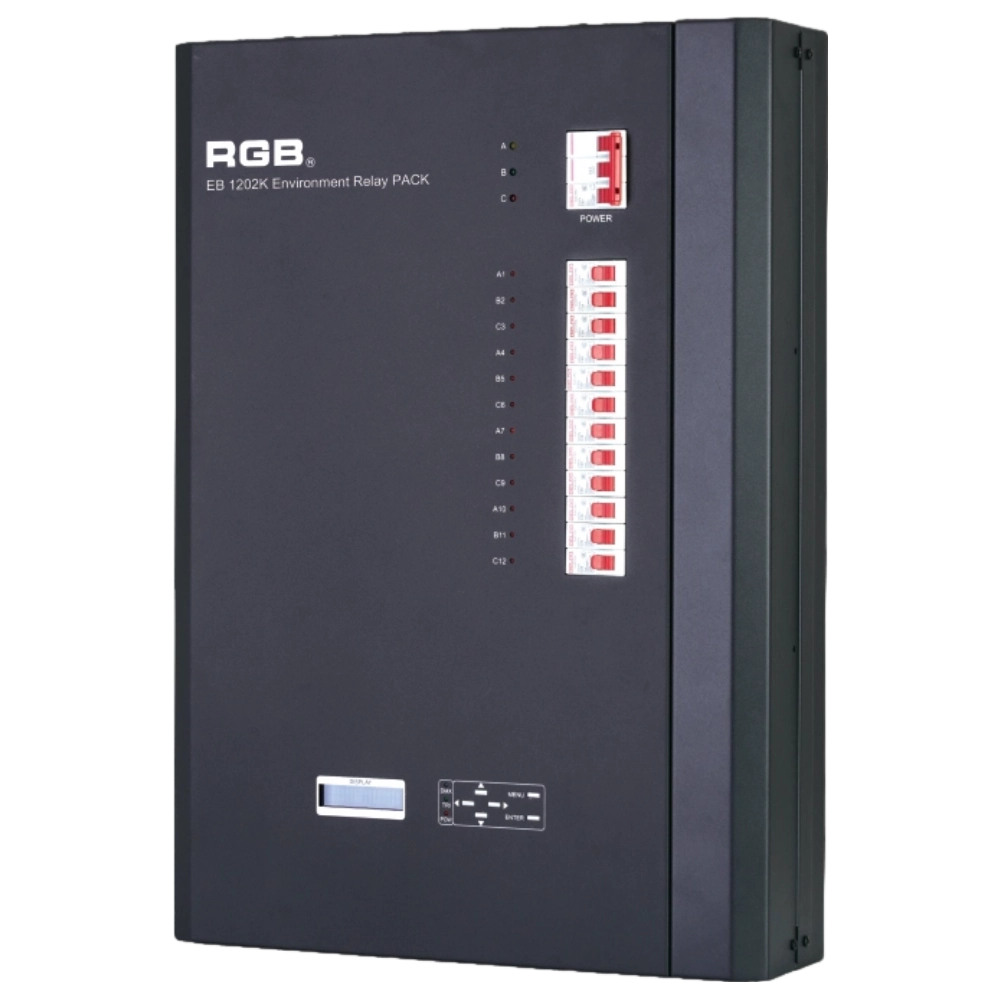
EB1202 Wall-Mounted Smart Site Light Control Series
Wall-mounted smart lighting controller with CE certification, DMX512 compatibility, flexible 12/24-channel output, scene backup, intelligent interface, and multiple dimming curves for precise professional lighting control.
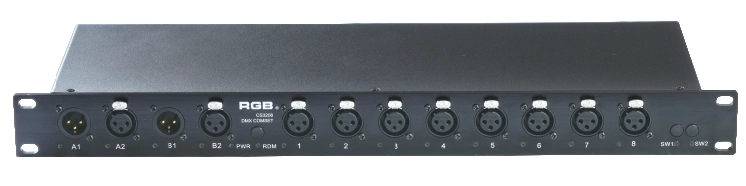
DMX&RDM Signal Mergers Amplifiers
The rack-mounted DMX signal amplifier complies with the DMX-512 standard protocol, improving the transmission quality of DMX-512 signals, ensuring the reliability of system control, and preventing faults such as reverse connection of AC high voltage in the lighting control system, high voltage intrusion due to lightning strikes, and line short circuits, which may affect the stability of the system.
Expert Support
Interested in learning more or need expert guidance related to this article? Fill in your details, and our team will provide tailored support.
Intelligent Control. Brilliant Performance.
RGB specializes in stage lighting control systems, delivering intelligent, reliable, and high-performance solutions for theaters and performance spaces worldwide.
Contact
Email:
Tel:
+86 20 3928 0245
+86 20 3928 0247
Address:
No.3, Huashan Road, Shilou Town, Panyu, Guangzhou, China.
Whatsapp: +8615975520131